
Opus 5.5 video generation tutorial
Create professional motion graphics with Claude Opus 5.5|
Want to quickly create brand animations, product explanations, or social media ad intros without opening After Effects? This article Opus 5.5 video tutorial will teach you how to use Claude Opus 5.5 as a motion graphics director: write a good prompt, generate renderable animation code, and compose a deployable Opus 5.5 video . At the end, it will also explain how users in Hong Kong can use ai9app to get started more easily—no need for a VPN, and no need to subscribe to expensive toolchains.
Why is Opus 5.5 particularly suitable for motion graphics?
Traditional motion design requires managing storyboards, keyframes, transitions, colour schemes, and text rhythm. Claude Opus 5.5 excels at compressing these decisions into executable programs and storyboard descriptions: it can produce a complete showreel structure, dynamic text, chart animations, and even draw frames with code.
Suitable topics include: product/SaaS feature demonstrations, YouTube explanations and tutorials, dynamic text, data charts, social media ads, logo intros, and event announcements.
If you want live-action acting or realistic street scenes, it is still recommended to pair it with video generation models; both can be mixed, using realistic clips as backgrounds and layering Opus 5.5 generated motion graphics on top.
To put it clearly in SEO terms: Opus 5.5 video refers to "motion graphics videos driven by Opus 5.5, produced with programs/storyboards"; while Opus 5.5 video tutorial breaks the process down into replicable steps.
Opus 5.5 Video Tutorial: Create a usable motion graphic in five steps
Step 1|Define the "final piece" rather than the "model" first
Before writing the prompt, answer four questions: length (e.g., 15 seconds), aspect ratio (portrait 9:16 or landscape 16:9), purpose (showreel, product launch, tutorial), and prohibitions (no subtitles, no watermarks, no random logos). Write these four points into the first paragraph so the model doesn't go too far off track.
Step 2|Start with a "high-leverage prompt"
The most commonly copied and easiest to generate high views on social media is the Opus 5.5 video opening line, which generally looks like this:
Make a dynamic 15-second motion graphics showreel that proves what an incredible motion designer you are. Go all out.
This sentence is short, has a clear goal, and a bold tone, making it suitable as a first draft. Then add brand colours, fonts, shot rhythm, and ending CTA.
Step 3|Request output of an "executable workflow"
Advanced writing is not just about textual descriptions, but requires Opus 5.5: first produce a storyboard (one visual goal every 3 seconds); then provide animation specifications (easing, transitions, text entry); finally deliver executable programs (such as Canvas/Three.js/p5.js) or clear rendering steps. This way, you receive iterative assets, rather than a one-off black box video.
Step 4|Small iterative cycles, do not seek perfection all at once
The first version focuses on rhythm and composition; the second version locks in brand colours and typography; the third version then addresses sound effects and the ending CTA. Only change one variable per round,Opus 5.5 video tutorial What is truly useful is this kind of traceable iterative habit.
Step 5|Output and upload checks
Pre-final check: Are there any garbled texts, are brand colours consistent, does the ending pause for 1 second to let people remember the logo, is the vertical platform cropped to the key points? Pass this before uploading short videos or landing pages.
Real X (Twitter) case: How high-view Opus 5.5 Videos tell stories
The following cases are all from X public posts, suitable for inspiration and prompt reference (view counts may vary over time):
Case A|15-second Motion Showreel in one sentence
RoundtableSpace Demonstrated with max effort, just give one sentence: "make a 15-second motion graphics showreel that proves what an incredible motion designer you are, go all out." and you can deliver a complete motion result. This is also the easiest to get started with.Opus 5.5 video tutorial Starting point: one sentence first, then add brand constraints.
Case B|Open-source Motion Design Prompt template
twoclipping Public motion design prompt template, emphasising letting Opus 5.5 handle UI morphing and shape transitions. Suitable for product interface demonstrations and state transition animations. If you want to create SaaS feature videos, you can refer to the approach of "first listing 8–12 UI states."
Case C|Resume-level Showreel Prompt widely reused
ajith_io、kenn Creators like them adopt similar 15-second motion graphics/showreel prompts, proving that the same high-leverage command can produce different styles across accounts. For SEO and content marketing teams, this means:Opus 5.5 video can be turned into a scalable content production line, rather than a one-time flash of inspiration.
Case D|Workflow revealed: from reference videos to style alignment
rexan_wong Not only posting finished products, but also sharing the workflow of "how to align reference video styles." This is crucial for brand consistency: first provide references, then ask Opus 5.5 to match rhythm and visual language.
Advanced Prompt formula: make Opus 5.5 Video more "advertisement-like"
You are a senior motion designer. Please create a 【15 seconds】【16:9】 motion graphics video with the theme of 【product name】.
Target audience: 【Hong Kong / Greater China SaaS decision-makers】.
Style: Clean, high contrast, techy, main colour 【#0A84FF】, secondary colour 【#111111】.
Structure:
0–3s Logo impact entrance
3–8s Three features explained with dynamic icons
8–12s Data chart rising
12–15s CTA "Try Now" + website
Restrictions: No watermarks, no random brand placements, no full-screen subtitle walls.
Output: 1) Storyboard 2) Animation specifications 3) Executable program or step-by-step rendering instructions.
This set is practical.Opus 5.5 video tutorial Core: Roles + Specifications + Timeline + Restrictions + Output format.
A simpler approach for Hong Kong users: Use AI9app to generate Opus 5.5 motion graphics.
If you want to skip the hassle of stringing tools together, finding model quotas, and dealing with regional internet restrictions, you can directly use marketplace teaching resources:
Click: Claude Opus 5.5 motion graphics tutorial (AI9app)
AI9app AI Space Note:
https://ai9app.io/zh-TW/ai-space-note
The page clearly lists applicable scenarios: product introduction, SaaS feature demonstration, YouTube explanations, teaching steps, dynamic text, data charts, social media ads, logo intros, event announcements; and reminds that realistic street scenes/real people acting are more suitable for video models, and realistic clips can also be mixed into motion graphics as backgrounds.
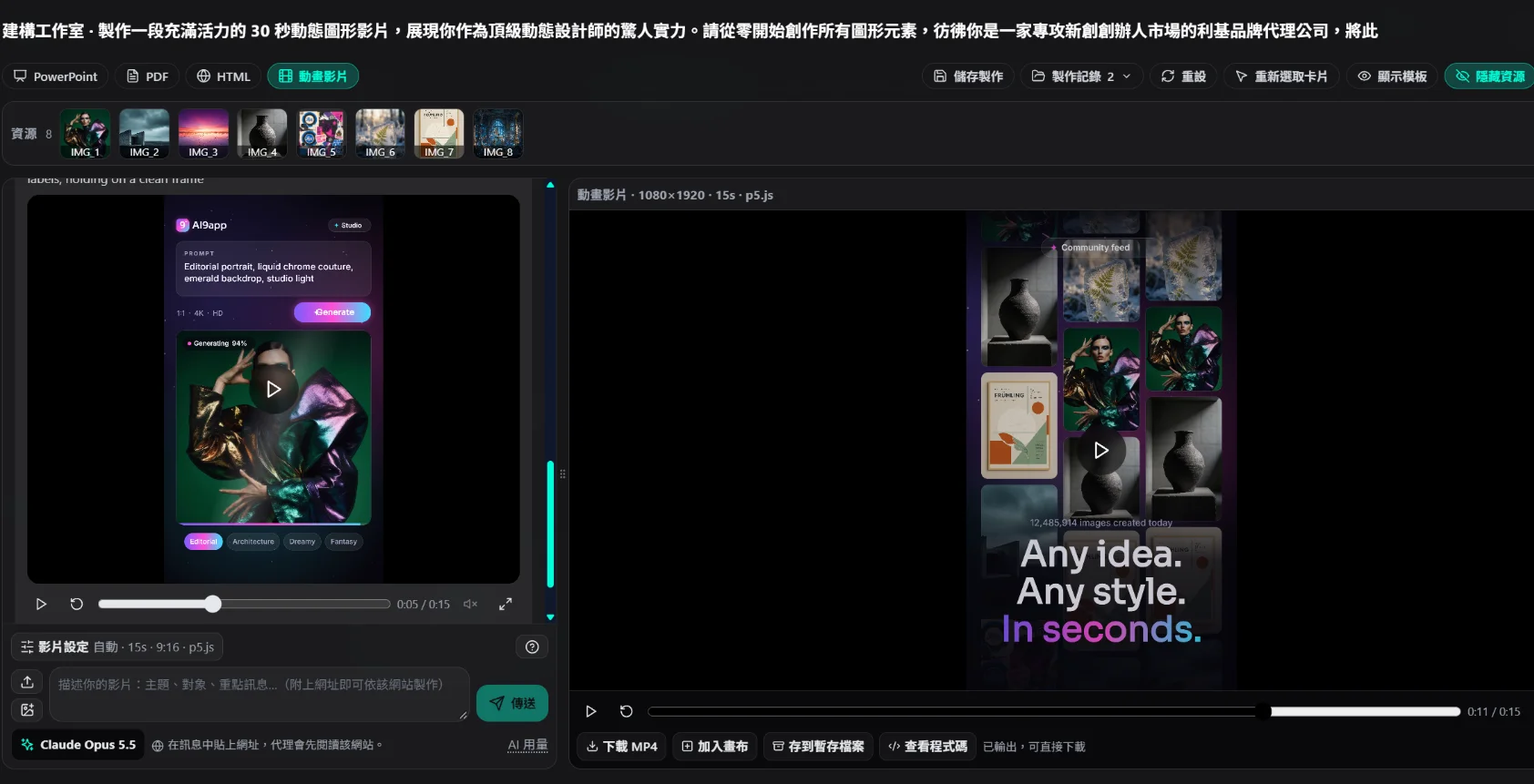
Three points particularly practical for Hong Kong users:
- Simpler process : Organise "how to create Opus 5.5 motion graphics" into direct follow-along tutorials and resources, reducing the need to piece things together on X.
- More convenient to use in Hong Kong : No need to rely on a VPN to access specific platforms to start practicing and producing.
- No need to subscribe to a bunch of services first : First use the tutorials and resources on AI9app to create the first Opus 5.5 video and then decide whether to deepen the toolchain.
Recommended path to get started: First open the above AI9app page → Select a topic based on the tutorial (e.g., logo intro or feature demonstration) → Apply a showreel prompt from the text to create the first version → Then use brand colours and CTA to create the second version iteration.
Common mistakes (to avoid when making Opus 5.5 Video)
- Just writing "make a cool video": No seconds, ratio, or purpose, resulting in uncontrollable outcomes.
- Mixing realism and motion graphics as the same requirement: Mismatched topics will waste iteration cycles.
- Not retaining sources and versions: Cannot A/B test later, nor can SEO content reuse be done.
- Ignoring localization: When targeting a Hong Kong audience, font size, traditional terminology, and CTAs (e.g., "Try Now", "Learn More") must be consistent.
Who is most suitable to start making Opus 5.5 Video now?
- One-person companies/freelancers: Use a 15-second showreel to quickly update portfolios and project pages.
- Startup marketing: Regularly produce feature explanation short videos weekly to reduce waiting for design outsourcing.
- Educators and knowledge-based creators: Turn abstract concepts into dynamic illustrations to improve completion rates.
- Local brands in Hong Kong: Traditional copy + local CTAs, directly posted on IG / Xiaohongshu / YouTube Shorts.
If your goal is to "first have stable production capacity", please treat this article as a repeatable Opus 5.5 video tutorial,rather than a one-off inspirational piece.
Replicable SOP abstracted from case X
- Collection:Select 3 high-view Opus 5.5 related posts each week, only noting the structure without copying the visuals.
- Abstract:Extract the four columns of 'seconds / shots / emotions / CTA'.
- Localization:Change to traditional Chinese, Hong Kong terminology, and your product benefits.
- Generation:Produce storyboards + executable specifications using Opus 5.5.
- Validation:Internal 30-second review (rhythm, readability, brand consistency).
- Launch + Review:Record playback and interactions, and write back the next round of prompts.
This SOP can turn scattered Opus 5.5 video hits into a sustainable content system.
Conclusion: Turn Opus 5.5 into your dynamic image production line
Opus 5.5 video's competitive edge is not about who randomly creates a hit, but who can use a stable Opus 5.5 video tutorial process to produce deployable dynamic content weekly. From high-view cases on X, it can be seen that a high-leverage prompt, clear storyboard specifications, along with reusable templates, are already enough to get started.
If you are in Hong Kong and want to start with lower setup costs, it is recommended to directly refer to and use Claude Opus 5.5 Dynamic Image Tutorial|AI9app:The context is right, and the process is short, suitable for delivering the first complete piece before moving towards branding and scaling.
Final reminder: Readers searching for 'Opus 5.5 video' or 'Opus 5.5 video tutorial' mostly want immediately actionable methods. By saving the steps in this article, the X source links, and the AI9app tutorial, you can deliver your first usable piece in the shortest path.
SEO tag suggestions: Opus 5.5 video · Opus 5.5 video tutorial · Claude Opus 5.5 · dynamic images · motion graphics · AI9app · Hong Kong
AI9app AI Space Note: